September 20, 2026
Stop Repeat Questions: 2 Patterns, 6 Context Items for Chatbot Human Handoff
A practical playbook for engineers and support ops: pick bot-as-agent or bot-as-proxy, transfer six required context items at handoff, then test routing...
Stop Repeat Questions: 2 Patterns, 6 Context Items for Chatbot Human Handoff
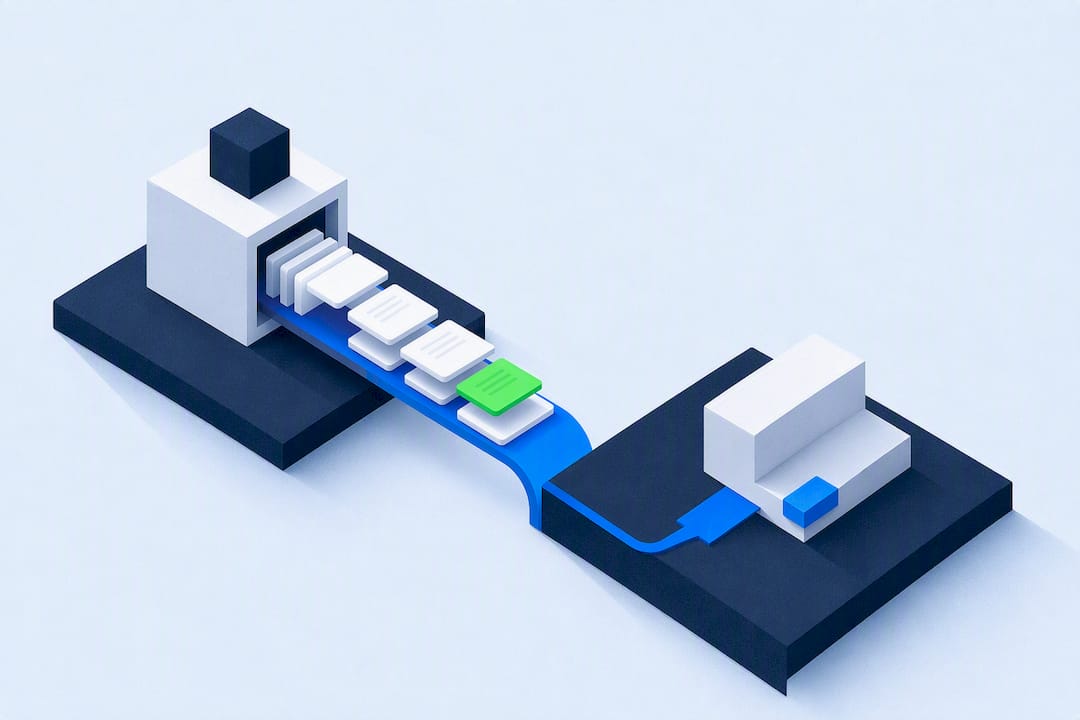
The choice between two handoff patterns, plus six pieces of context, decides whether your customers repeat themselves to a live agent. Use bot-as-proxy when the automation needs to stay involved after escalation; use bot-as-agent when it should step aside cleanly. Either way, the agent needs the full transcript, the identified intent, authentication status, actions already attempted, the reason for escalation, and a recommended next step, transferred before the agent connects.
TL;DR:
- Most escalation triggers should be based on intent confidence per specific context, avoiding a single global threshold for better routing accuracy.
- The full transcript, intent classification, authentication status, previous actions, escalation reason, and conversation ID are essential for effective handoff payloads.
- Using bot-as-agent simplifies architecture and is generally safer for support teams, while bot-as-proxy is suitable when ongoing data access or audit trail is needed.
- Post-launch metrics like containment rate, escalation sources, handle time, and repeat contacts are critical to refining and optimizing handoff processes.
- Deploying a branded, multi-channel handoff platform with standardized configuration streamlines setup and maintains consistency across clients, reducing custom development efforts.
Table of Contents
- What is a chatbot human handoff?
- Which events should trigger escalation to a live agent?
- What context must transfer with every handoff?
- How do you build and test a chatbot handoff?
- What KPIs should you track after launch?
- How does a white-label platform support reliable handoffs?
- What experienced teams get wrong about the rollout
- Launch branded agents with handoff logic built in
- Where to go for the technical detail
- Sources
- FAQ
What is a chatbot human handoff?
A chatbot human handoff is a controlled escalation that moves a conversation from automation to a live-agent queue without forcing the customer to restart. Done well, it preserves everything the bot already knows and routes the conversation to whoever can actually solve it. Done badly, it dumps a stranger into a queue with no notes attached, and the agent spends the first three minutes asking questions the bot already answered.
Microsoft’s Bot Framework documentation defines two canonical integration patterns for this, and the choice between them shapes your entire architecture: bot-as-agent and bot-as-proxy.
In bot-as-agent, the bot hands the conversation fully to the human agent and steps out of the loop. The agent owns the thread from that point on, which keeps the architecture simple and avoids any risk of the bot re-injecting itself into a delicate conversation.
In bot-as-proxy, the bot stays technically present, relaying messages between the customer and agent, filtering content, and adding context as the conversation continues. This pattern suits cases where you need an ongoing audit trail, live translation, or the ability to pull in real-time data (order status, account balance) mid-conversation without the agent leaving the chat interface.
Which one you pick affects three things directly:
- Event flow: bot-as-proxy needs a persistent message-relay loop; bot-as-agent needs a clean, one-time handoff event.
- Ownership: bot-as-agent gives the human full control immediately; bot-as-proxy means the bot retains partial responsibility for message integrity.
- Privacy: a proxy pattern means the bot continues to process customer messages after escalation, which has data-handling implications your compliance team will want to see mapped out before launch.
For most support teams handling billing disputes or account issues, bot-as-agent is the simpler build and the safer default. Save proxy patterns for cases where the bot delivers genuine ongoing value, like live order-status lookups during a delivery dispute.
Which events should trigger escalation to a live agent?
Escalation triggers split into two families, and the mistake most teams make is treating only the first family as real.
Explicit triggers are the easy ones: the customer types “talk to a human,” the query hits a policy exception your bot isn’t authorised to resolve, or the intent classifier matches a known edge case flagged for mandatory escalation (fraud reports, legal threats, safety complaints).
Implicit triggers are harder to get right and where most containment strategies fall apart:
- Low confidence scores on intent classification, typically below a threshold you set per intent, not globally.
- Repeated failed attempts, where the customer rephrases the same question two or three times without resolution.
- Negative sentiment, detected through tone analysis or escalating message length and punctuation.
- Verification failures, where the customer can’t complete identity checks the bot requires to proceed.
A single confidence threshold applied across every intent almost never works in practice. Copilot Studio’s handoff documentation supports this with structured context variables passed at transfer time, but the trigger logic behind those variables has to be queue-aware: a billing question at 80% confidence during business hours might route straight through, while the same score on a cancellation request at 11pm should escalate immediately because no agent will see it until morning anyway.
Routing rules matter just as much as the trigger itself. Map each escalation type to a specific skill-based queue rather than a single generic inbox. A billing dispute needs the billing team; a technical fault needs Tier 2 support; a complaint with legal language needs whoever handles disputes, not whoever’s next in the round-robin.
Pro Tip: Build your trigger policy as a lookup table (intent × channel × time of day) rather than a single global rule. It takes an extra afternoon to build but saves months of misrouted tickets.
What context must transfer with every handoff?
The single biggest failure in chatbot escalation isn’t the trigger. It’s the payload. A trigger fires correctly, the customer lands in a queue, and the agent still has nothing useful to work with because nobody defined what “context” actually means.
The non-negotiable minimum payload includes:
- Full transcript of the automated conversation, not a summary
- Identified intent, as classified by the bot
- Authentication or verification status, so the agent knows whether identity is confirmed
- Actions already attempted, including any API calls, lookups, or troubleshooting steps the bot ran
- Reason for escalation, stated plainly (low confidence, explicit request, policy exception)
- Conversation ID, so every system in the chain can reference the same thread
Beyond that minimum, useful extras include confidence scores at the point of escalation, any topic-specific variables the bot collected (order number, product SKU, account tier), linked ticket IDs from prior contacts, and the results of the last system checks the bot ran. Copilot Studio’s default variable set, things like va_LastTopic, va_ConversationId, and va_AgentMessage, gives a concrete template for what a structured handoff payload looks like in production.
Sequencing is where a lot of otherwise well-built handoffs quietly fail. If the context payload arrives after the agent has already connected, the agent can’t use it in real time; they’re stuck reading a transcript while the customer is already talking. The fix is to push the handoff payload to your engagement hub or helpdesk before the agent picks up, not as a parallel event fired at the same moment. For very long transcripts, don’t jam the whole conversation into the initial event payload. Handle it with a contentUrl attachment the agent’s interface can pull on demand, which keeps the handoff event itself lightweight and fast.
Intercom’s guidance frames this as designing the handoff note explicitly into the automation rather than treating it as an afterthought bolted onto the transfer event.
How do you build and test a chatbot handoff?
This is where good intentions meet production reality. A handoff that works in a demo and a handoff that survives a Friday-afternoon traffic spike are two different engineering problems.
Step-by-step build sequence:
- Define escalation rules and map them into workflows. Separate explicit paths (user-requested, policy-triggered) from implicit paths (confidence, sentiment, repeated failure) so each can be tuned independently.
- Standardise your context-variable schema. Decide the exact field names, types, and required/optional status for every context item before you write a line of integration code. Inconsistent naming across teams is the single most common cause of dropped context in production.
- Define the handoff-note format. Structure it around a one-sentence summary, what the bot collected, what checks it ran, why it escalated, and a recommended next step for the agent.
- Implement the handoff-initiation event. This fires the moment a trigger condition is met, carries the full payload, and targets the correct queue based on your routing rules.
- Handle
handoff.statusevents. Build for the full lifecycle, not just the initial trigger: pending, accepted, rejected, and timed-out states all need defined behaviour. - Implement retries and failure modes. If the engagement hub doesn’t acknowledge the handoff within a set window, what happens? Silent failure leaves the customer stranded with a bot that thinks it’s done its job.
- Build the client-side render path. The chat widget or interface has to switch cleanly from bot UI to live-agent UI without a renderer error or a blank screen during the transition.
Test coverage needs to match the complexity of what you’ve just built:
- Unit tests on trigger logic in isolation, covering every intent and confidence-threshold combination you’ve configured.
- Integration tests confirming the context payload arrives at the engagement hub with every required field populated.
- End-to-end tests running a full simulated conversation from bot interaction through to a human agent picking up the thread.
- Synthetic escalation tests that fire triggers on a schedule in a staging environment to catch silent regressions before they hit production.
- Timing assertions verifying context arrives before the agent-connect event fires, not after.
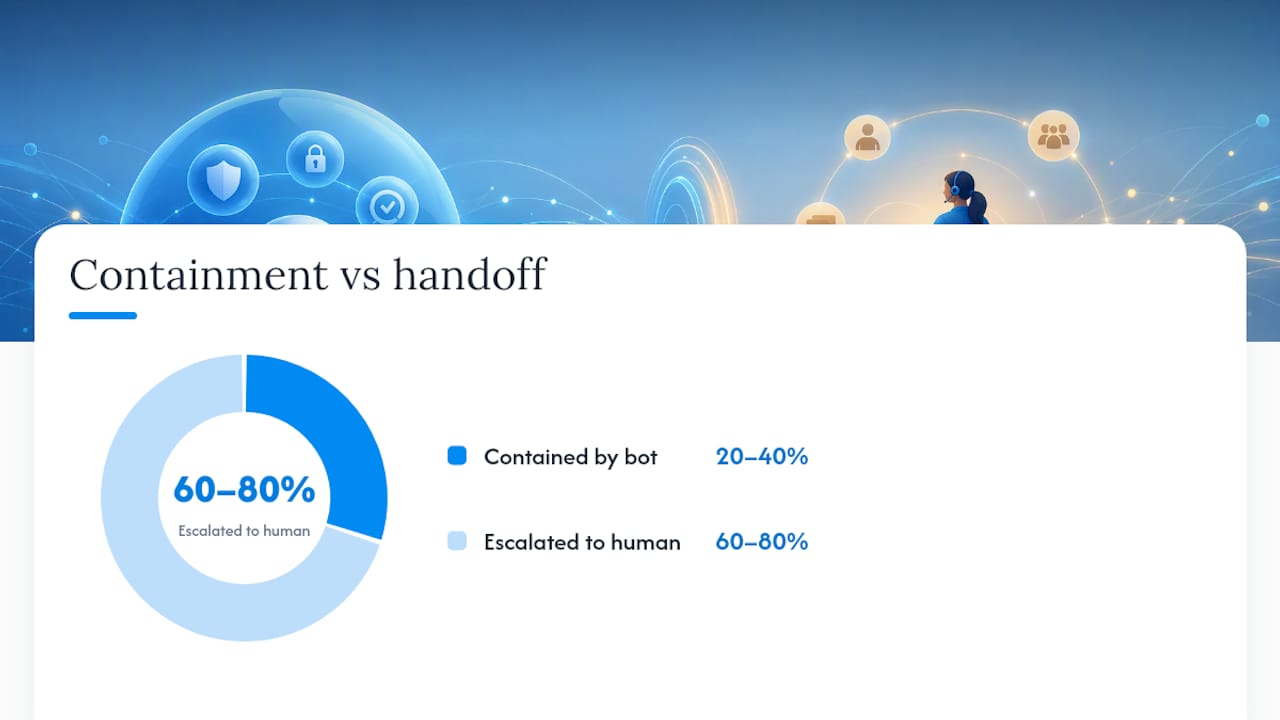
Real-world containment data gives a useful benchmark for expectations here. Production voice AI deployments typically achieve containment rates of around 20 to 40%, which means the majority of contacts in many setups will hit a handoff at some point. If your testing only covers the happy path where the bot resolves everything, you’ve tested the minority case.
What KPIs should you track after launch?
Launch day isn’t the finish line. It’s the point where your metrics start telling you whether the handoff logic you built actually matches how customers behave.
Track these on a recurring basis:
- Containment rate, the percentage of conversations the bot resolves without escalation.
- Escalation rate by trigger and by intent, so you can see which specific triggers are firing most and whether that matches expectations.
- Post-handoff handle time, how long agents spend once they pick up an escalated thread. A high number often signals poor context transfer, not agent inefficiency.
- Repeat contact rate, whether customers come back within a short window after an escalation, a strong signal the first resolution didn’t stick.
- CSAT specifically for escalated conversations, kept separate from your overall CSAT so a spike in escalations doesn’t get buried in an average.
The real value comes from treating this data as a feedback loop rather than a dashboard you check once a month. Tag the exact trigger and intent behind every escalation, then sample a batch of transcripts regularly to work out whether rising numbers reflect a genuine knowledge-base gap or simply mistuned trigger thresholds. Those are different problems with different fixes, and conflating them wastes engineering time on the wrong lever.
When agents flag a bad handoff, that flag should feed directly back into either updating a bot topic, retraining a model, or adjusting a routing rule, not sitting in a spreadsheet nobody revisits.
Pro Tip: Run a weekly escalation-tag audit for the first 90 days after launch. After that, monthly is usually enough unless you’ve just shipped a major bot update.
How does a white-label platform support reliable handoffs?
Deploying a branded agent across multiple channels raises a specific version of the handoff problem: consistency. If every client or tenant configures escalation logic differently, your support team faces a different handoff format for every account.
A platform built for multi-channel deployment addresses this at the infrastructure level rather than leaving it to each implementation team to solve independently:
- A configurator for setting agent behaviour and context variables once, so handoff-note fields stay consistent across every tenant rather than being rebuilt per client.
- A brand-kit generator that preserves the client’s UX and tone through the handoff moment, so the transition from bot to agent doesn’t feel like switching products mid-conversation.
- Server-side revenue and event tracking, which gives resellers visibility into where in the funnel escalations happen and whether they correlate with conversion.
- Enterprise-grade security controls, relevant given that context payloads often carry authentication status and personal account details.
- Quick deployment, typically inside a week, which matters when a client’s escalation policy needs to launch alongside the agent, not bolted on afterward.
Agent Release AI is built around this problem: giving agencies and resellers one configuration layer instead of rebuilding handoff logic for every client from scratch.
What experienced teams get wrong about the rollout
Most teams treat the handoff build as a one-time engineering project rather than an operational discipline. That’s the mistake. Pilot the automation on one queue first, review escalation transcripts weekly, and let the pattern of what’s failing tell you where to invest next, rather than trying to configure every trigger perfectly before launch.
Co-design the bot’s configuration with the agents who’ll receive the handoffs, not just the engineers who build them. Agents know which context fields they actually read under time pressure and which ones they ignore. Train agents to scan the handoff note in seconds, resist re-interviewing the customer from scratch, and flag any handoff that arrived with missing or wrong context. That flag is more valuable long-term than the ticket itself. Gartner’s own forecast on agentic AI handling more routine service work only raises the stakes on getting the human side of this right, because the conversations that do escalate will be the harder ones.
— Agent
Launch branded agents with handoff logic built in
Agentrelease is the alternative to building this integration layer from scratch for every client. Rather than spending weeks mapping context variables and handoff-note schemas per tenant, you configure them once and deploy across iMessage, WhatsApp, Instagram DMs, SMS, email, web chat, and voice under your own brand.
The configurator lets you standardise context variables and escalation behaviour before launch, so every client gets the same reliable handoff without a separate build each time. The brand-kit generator keeps the customer experience consistent through the transition from bot to human agent, and server-side revenue tracking gives resellers a clear view of where escalations happen in the funnel. For agencies managing multiple client accounts, unlimited tenant creation means you’re not paying per client for the same infrastructure.
Deployment typically runs under a week, and the Agent Release AI plan runs $497 per month with unlimited agents and channels. If you’re managing this for multiple clients, the White-Label Program adds full branding and domain control on top. Check current pricing and book a walkthrough to see how your specific escalation logic would map onto the platform.
Where to go for the technical detail
For implementation specifics beyond this guide, go straight to the source documentation. Microsoft’s Bot Framework handoff design patterns cover the architecture, Copilot Studio’s handoff guide covers the variable schema, and Intercom’s collaboration and handoff procedures cover the operational note format and training process. For voice-specific sequencing, Wattle’s AI voice agents are worth reviewing if phone-based handoffs are part of your stack.
Sources
- Bot framework: handoff design patterns (Microsoft Learn)
- AI human collaboration and handoffs (Intercom learning centre)
- Gartner press release on agentic AI adoption
FAQ
What is the difference between bot-as-agent and bot-as-proxy?
Bot-as-agent hands the conversation fully to the human and steps out; bot-as-proxy keeps the bot relaying and filtering messages after escalation. Microsoft’s documentation recommends bot-as-proxy when the bot needs to stay technically involved, such as adding live data mid-conversation.
What minimum context should transfer during a handoff?
The full transcript, identified intent, authentication status, actions already attempted, the reason for escalation, and a recommended next step for the agent. Copilot Studio’s default variable set, including va_LastTopic and va_ConversationId, gives a concrete template for this payload.
How do I set confidence thresholds for escalation?
Avoid a single global threshold; set thresholds per intent, channel, and operating hours instead. A low-stakes question might tolerate a lower confidence score than a cancellation or billing dispute, where a wrong automated answer costs more.
Does a chatbot handoff raise privacy concerns?
Yes, particularly under the bot-as-proxy pattern, where the bot continues processing customer messages after the human agent joins. Map out what data the bot retains post-handoff and confirm it aligns with your organisation’s data-handling obligations before deployment.
How much does Agent Release AI cost?
The Agent Release AI plan is $497 per month with unlimited agents and channels. The White-Label Program adds full branding and domain control, with pricing available on request through the white-label page.