September 17, 2026
Launch a Branded Knowledge Base Chatbot in a Week for Agencies
Vendor neutral steps to deploy a branded knowledge base chatbot in days. Learn RAG setup, content prep, governance, and white label options.
Launch a Branded Knowledge Base Chatbot in a Week for Agencies
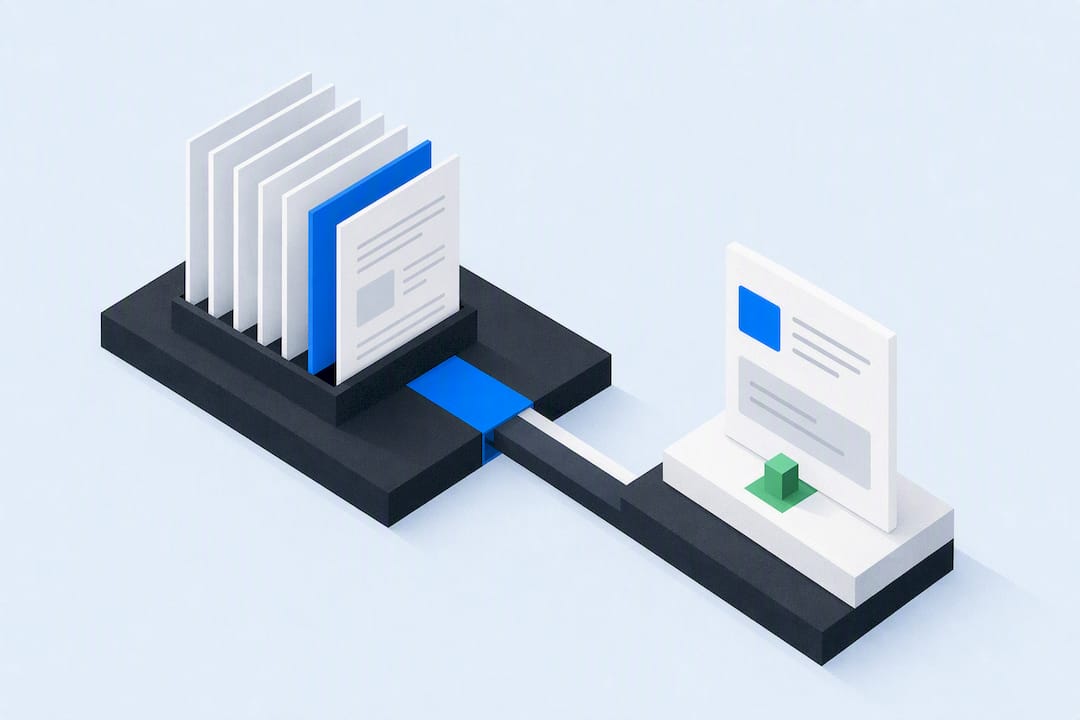
A knowledge base chatbot is an AI assistant that reads your help articles, manuals, and internal notes, then answers customer or staff questions directly instead of pointing them to a search results page. The main payoff is fewer repetitive tickets and answers that are available around the clock. This guide covers how the technology works and how to build, deploy, and govern one properly.
TL;DR:
- A knowledge base chatbot uses semantic search and retrieval-augmented generation to provide direct answers grounded in your documentation, reducing errors from hallucination.
- Proper content preparation, including clear answers and excluding outdated material, is crucial for accurate and trustworthy responses.
- Limiting scope to one problem area and testing escalation rules before wider deployment improves accuracy and prevents early project failures.
- Metrics such as ticket deflection, resolution rate, customer satisfaction, and response time should guide pilot success and ongoing improvements.
- Starting narrow with a single channel and expanding once accuracy is proven offers faster scaling and better brand consistency.
Table of Contents
- What is a knowledge base chatbot, and how is it different?
- What business benefits can you actually expect?
- How does a knowledge base chatbot actually work?
- Which type of knowledge base chatbot fits your goals?
- How do you build and launch one, step by step?
- How do you prepare content the bot can actually use?
- How do you keep responses trustworthy and safe?
- What metrics prove the bot is working?
- What white-label deployments teach you about scaling
- Launch your own branded agent without building the stack yourself
- Sources
- FAQ
What is a knowledge base chatbot, and how is it different?
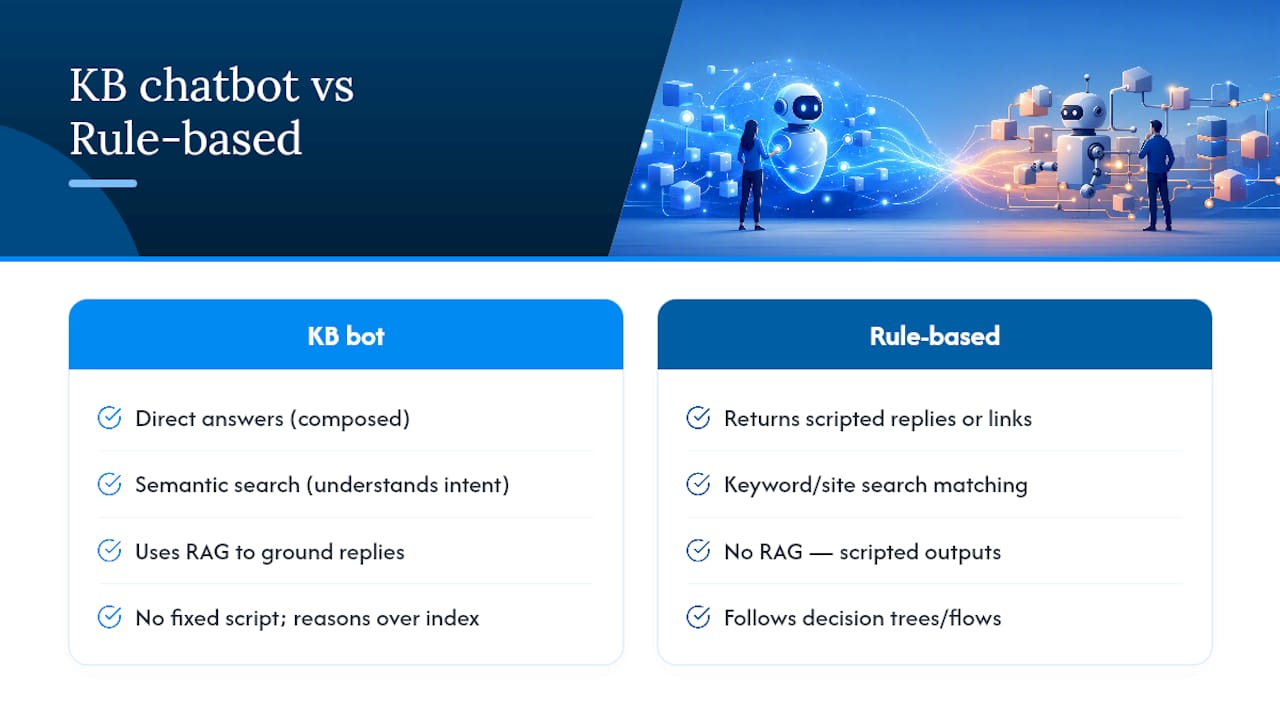
A knowledge base chatbot pulls answers from your existing documentation and gives a direct response, rather than returning a list of “articles that might help.” That single distinction separates it from a standard chatbot script or a site search box. Traditional site search matches keywords; a knowledge base chatbot understands intent and meaning, so a question phrased awkwardly still finds the right passage.
This works through semantic search, which reads the meaning behind a query rather than matching exact words. Ask “why won’t my invoice send” and a keyword search might miss an article titled “Troubleshooting Outbound Billing Errors.” A semantic system connects the two instantly. Layer in retrieval-augmented generation (RAG), and the bot doesn’t just find the article, it composes a direct answer grounded in that content, which is how an AI knowledge base returns direct answers instead of a pile of matching links.
Most deployments draw on a mix of sources such as help centre articles, FAQ pages, product manuals, technical documentation, CRM notes, past support ticket resolutions, internal wikis, onboarding guides, policy documents, and pricing pages.
A rule-based chatbot, by contrast, follows scripted decision trees and breaks the moment a question falls outside its flowchart. A knowledge base chatbot has no fixed script. It reasons over whatever’s indexed.
What business benefits can you actually expect?
Ticket deflection is the headline metric, and it’s a real one. When a bot handles routine questions like “what’s your refund policy” or “how do I reset my password,” fewer tickets reach a queue at all, and the ones that do tend to be genuinely complex.
The realistic gains break down into three buckets:
- Ticket deflection: routine, repeatable questions get resolved without a human touching them
- 24/7 availability: customers in different time zones get an answer at 2am, not a “we’ll respond within 24 hours” auto-reply
- Agent assist: support staff get suggested answers pulled from the same knowledge base, cutting research time mid-conversation
Market signal: the chatbot market is projected to grow strongly through 2030, driven largely by demand for 24/7 automated support and self-service efficiency, not novelty.
None of this means the bot replaces your team. Complex complaints, account-specific disputes, and anything involving money or emotion still need a human. A well-designed system knows its limits and hands off cleanly rather than guessing.
How does a knowledge base chatbot actually work?
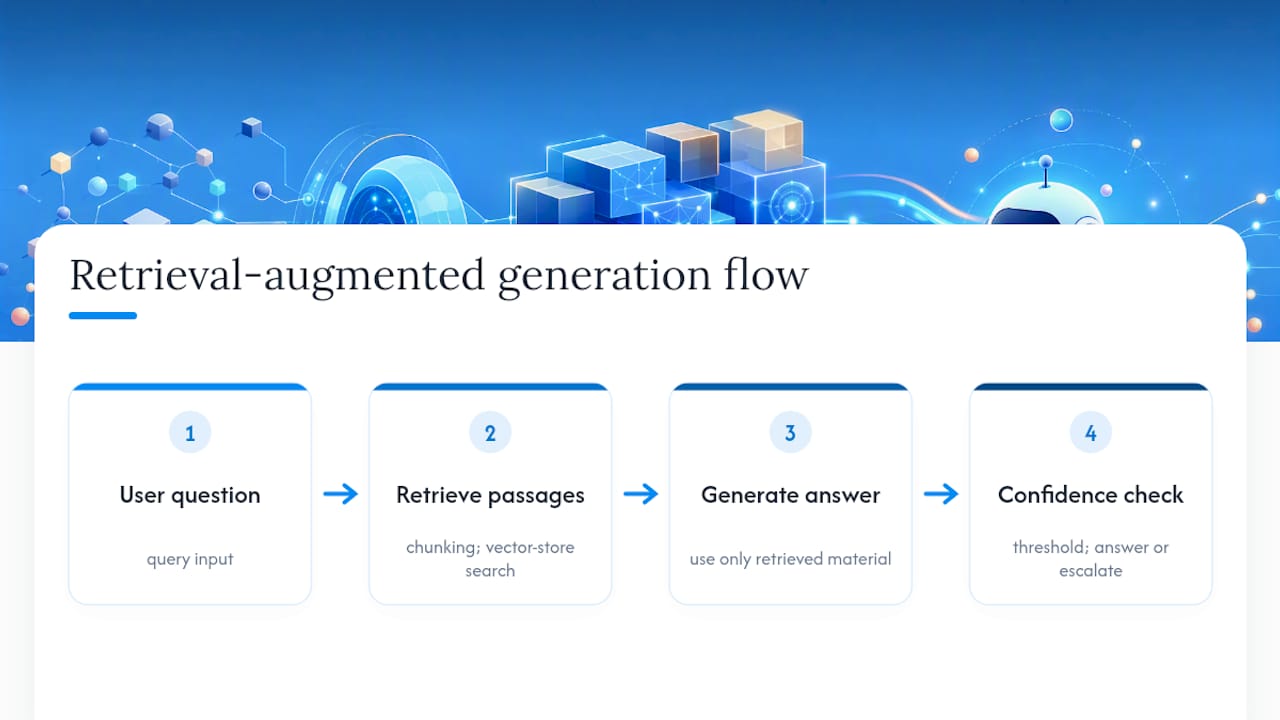
Under the hood, most modern systems run on retrieval-augmented generation. The bot retrieves the most relevant passages from your indexed content, then generates a natural-language answer using only that retrieved material as its source. This matters because it reduces hallucination risk. Instead of the model inventing a plausible-sounding answer from general training data, it grounds the response in retrieved source content.
Getting there requires a few technical steps most buyers should understand, even without building it themselves.
Embeddings and vector stores. Every document gets converted into a numerical representation (an embedding) that captures meaning. These get stored in a vector database. When a question comes in, the system finds the embeddings closest in meaning to the query, not the ones sharing the most words.
Chunking and indexing. Long documents get split into smaller passages before embedding, because retrieval accuracy usually drops if you feed the model an entire 40-page manual at once. Indexing cadence matters too. Content changes, so the index needs a refresh schedule, whether that’s live syncing or a nightly batch job.
Confidence thresholds. A properly built bot scores its own certainty before answering. Below a set threshold, it should say it doesn’t know, or route to a human, rather than guessing with confidence. CRM-integrated bots can escalate with the customer’s history attached, so the person doesn’t have to repeat themselves to a human agent.
Which type of knowledge base chatbot fits your goals?
Not every deployment serves the same purpose, and picking the wrong scope early is a common reason pilots stall.
- Customer-facing support bots handle FAQs, troubleshooting steps, and order or account questions, usually embedded on a website or messaging channel
- Sales assistants qualify leads, answer product and pricing questions, and hand warm prospects to a rep at the right moment
- Internal agent assistants sit alongside your support team, surfacing suggested answers and past resolutions so human agents close cases faster
A support bot needs strict accuracy guardrails since customers see it directly. A sales assistant can be more conversational, because a human closes the loop. An internal assistant can even tolerate lower confidence thresholds, since a trained agent reviews the suggestion before it reaches a customer. Choosing the wrong type for your first project, like launching an ambitious sales bot before your support content is even well organised, is one of the most common ways teams lose momentum on their first attempt.
How do you build and launch one, step by step?
Treat this as a checklist, not a one-shot project. Most successful deployments follow the same sequence.
- Define scope and user journeys. Pick one problem area first (billing, returns, onboarding) rather than trying to cover everything on day one. Vendors and implementation guides consistently recommend narrow scope to build reliable accuracy before expanding.
- Audit your content. Find gaps, contradictions, and outdated pages before anything gets indexed. Write canonical answers for your top 20 to 50 questions if they don’t already exist.
- Choose your architecture. Decide between a hosted RAG platform, a CRM-integrated build, or a white-label solution if you’re deploying on behalf of clients.
- Ingest and index. Load your content, set chunking rules, and configure embedding refresh schedules so new articles get picked up automatically.
- Build persona and refusal rules. Decide the bot’s tone, what it should never claim, and exactly when it says “I don’t know, let me connect you with someone.”
- Simulate and test. Run escalation simulations, deliberately asking questions the bot should refuse or redirect. This is widely regarded as the single most effective pre-production check for catching catastrophic failures before real customers do.
- Pilot, measure, iterate. Launch to a limited audience or channel, watch the metrics for two to four weeks, then expand.
Many teams underestimate how fast the technical setup can move once content is genuinely ready. Practical implementation guides report teams moving from raw help centre content to a working embedded agent in hours or days, assuming the source material is well-structured and the platform supports automated crawling.
How do you prepare content the bot can actually use?
Answer quality depends far more on content preparation than on which model powers the bot. A brilliant model fed disorganised documentation still gives disorganised answers.
- Write articles that lead with the direct answer, then explain reasoning, not the reverse
- Build a canonical Q&A layer for your most common questions, separate from long-form articles
- Add metadata and short summaries to long documents so retrieval can match intent faster
- Flag or exclude time-bound content (old promotions, deprecated pricing, seasonal policies) from the index entirely
Pro Tip: Rewrite your top articles so the first sentence stands alone as a complete answer. If someone read only that sentence and nothing else, would it solve their problem? If not, restructure it, because that’s exactly the fragment your retrieval system will most likely surface.
Sensitive or outdated documents are a genuine risk here. A refund policy from two years ago sitting unflagged in your index can get retrieved and quoted with total confidence, and the bot has no way of knowing it’s stale unless you tell it.
How do you keep responses trustworthy and safe?
Grounding is the governance foundation. Every answer should trace back to a specific source document, and the bot should cite or reference that source where practical. Build in an explicit “I don’t know” fallback for anything below its confidence threshold, rather than letting it improvise.
Logging matters more than most teams initially budget for. Sample a percentage of conversations weekly, review them for drift or emerging gaps, and put change control around what gets added to the index so nobody quietly uploads an unapproved document.
If you’re indexing CRM records or any personal customer data, data residency and privacy rules apply just as they would to any other system holding that information. Confirm where data is stored and processed before connecting live customer records. Escalation design deserves the same rigour: define clear SLA expectations for handoffs, so “connecting you to a human” doesn’t mean a ten-minute silent gap.
What metrics prove the bot is working?
Four KPIs matter more than the rest combined:
- Ticket deflection rate: the percentage of enquiries resolved without human involvement
- Automated resolution rate: how often the bot’s answer actually solves the problem, not just responds
- CSAT on bot-only interactions: satisfaction scores specifically for automated conversations
- Time to answer: average response latency, especially against your prior human-only baseline
Set pilot targets before launch, not after, so you’re not tempted to move the goalposts once results come in. A four-week pilot with a defined ticket volume gives you a clean before-and-after comparison for cost savings.
Don’t rely on quantitative metrics alone. Sample transcripts manually each week, checking specifically for confident-sounding wrong answers and poor escalation calls, since research on AI-driven support automation consistently stresses careful design to avoid over-automating and losing quality in the process.
What white-label deployments teach you about scaling
Watching agencies and resellers deploy branded AI agents across channels surfaces a pattern quickly: speed to first result matters more than feature completeness. Teams that launch with a tight scope, one channel, one knowledge domain, and expand only once accuracy holds up, consistently outperform teams that try to cover everything at once.
Multi-channel reach compounds the value fast. An agent proven accurate on a website chat widget can usually extend to WhatsApp or SMS with the same underlying knowledge base, provided the escalation rules travel with it. Brand controls matter too, particularly for agencies managing multiple clients, since the agent needs to sound like the client’s business, not a generic bot wearing their logo.
Start narrow. Prove accuracy. Expand channels second, not first.
— Agent
Launch your own branded agent without building the stack yourself
This platform is built for teams that want the deflection and 24/7 coverage a knowledge base chatbot delivers, without the months of engineering it usually takes to stand up a RAG pipeline, vector store, and multi-channel routing from scratch. Where a single-site widget only covers your website, this platform deploys the same grounded agent across WhatsApp, iMessage, Instagram DMs, SMS, email, web chat, and voice, all under your own brand, typically within a week.
If you’re an agency, consultant, or reseller planning to launch branded agents for multiple clients, the White-Label Program gives you unlimited tenant creation, custom domains, and server-side revenue tracking so you can resell without rebuilding infrastructure per client. The configurator handles branding and deployment without a developer on standby. If you’re evaluating this as a single business rather than a reseller, the core platform runs at $497 per month, unlimited agents and channels included, no per-message fees.
If any of this sounds like what you’ve just read about above, whether it’s testing content readiness or comparing local build-versus-buy options, worth checking 5Quotes’ AI chatbot directory if you want to compare integration partners before deciding. Start with your pricing or returns FAQ, prove the deflection rate, then scale channels from there.
Sources
- IMARC Group — Australia chatbot market
- How to create an AI knowledge base that actually works + expert insights — HubSpot
- BuiltABot — Turn your knowledge base into an AI chatbot (2026)
FAQ
What is a knowledge base chatbot?
A knowledge base chatbot is an AI assistant that answers questions by retrieving and interpreting content from your documentation, rather than following a fixed script. It uses semantic search and RAG to ground its answers in your actual source material instead of guessing.
What are the three best AI chatbots?
There’s no single universal ranking, since the right choice depends on whether you need customer support, sales qualification, or internal agent assist. Platforms like Agentrelease focus on white-label, multi-channel deployment for businesses and resellers, while others specialise in single-site widgets or narrow use cases, so match the tool to your specific goal rather than a generic “best” list.
What is knowledge base AI?
Knowledge base AI refers to systems that combine semantic search with generative models to produce direct, grounded answers from a company’s documents, CRM notes, and manuals. It differs from basic keyword search because it understands meaning and intent, not just matching words.
What’s the “dumbest” AI chatbot?
Any chatbot without grounding, meaning it answers purely from general training data instead of your actual documentation, tends to perform worst, since it will confidently invent answers about policies, pricing, or products it was never given accurate information about. This is precisely why RAG and confidence thresholds matter: they stop a bot from guessing when it genuinely doesn’t know.